
Battery Life Calculator: Free Runtime Estimator
Introduction
Have you ever looked at a battery-powered project and wondered, “How long will my battery last?” Guessing can leave a sensor offline, an LED display dark, or a portable device powerless at the worst possible moment.
A battery life calculator turns battery capacity and device consumption into a practical runtime estimate. FreeWWW’s tool goes further by considering battery type, voltage, temperature, efficiency, aging, multiple devices, and safety margins.
Key Takeaways
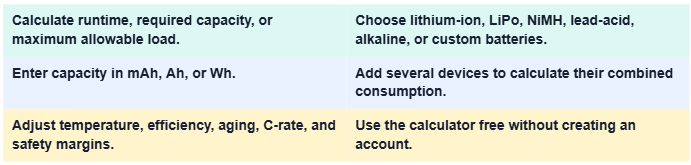
These features make the tool useful for electronics students, engineers, makers, technicians, and anyone planning a battery-powered system.
What Is a Battery Life Calculator?
A battery runtime calculator estimates how long a battery can operate a device before it reaches its usable discharge limit. It connects stored energy with the rate at which a device consumes that energy.
Think of the battery as a water tank and the electrical load as a tap. A larger tank lasts longer, but opening several taps drains it faster. The calculator performs this comparison instantly.
Why Calculate Battery Runtime?
A reliable estimate helps you choose the right battery, plan charging intervals, and avoid unexpected shutdowns. It can also reveal whether a proposed battery is too small or unnecessarily large.
A battery capacity calculator is valuable during product design. Instead of buying several batteries and testing each one, you can compare configurations before spending money.
Estimate How Long a Battery Will Last
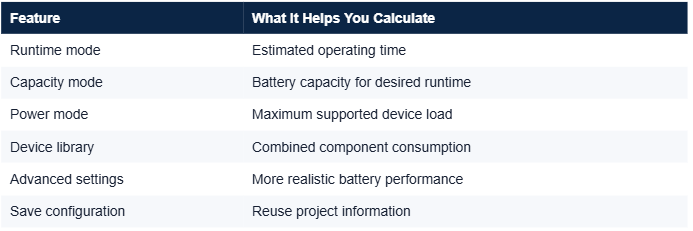
Runtime mode uses battery capacity and device load to estimate operating time. Results may be displayed as battery runtime in hours, minutes, or days.
This is helpful for portable electronics, remote sensors, emergency equipment, security systems, and other devices that must remain active for a specific period.
Select the Right Battery Capacity
Capacity mode works in reverse. You enter the desired runtime and power consumption, and the calculator determines the required battery capacity.
This prevents under sizing while helping you avoid excess weight, cost, and physical space caused by selecting a battery that is much larger than necessary.
What Is the FreeWWW Battery Life Calculator?
The FreeWWW Battery Life Calculator is a browser-based tool for estimating runtime, capacity, and allowable power consumption. It supports simple calculations and more detailed project planning.
The tool requires no registration. You can enter your information, review the results, and save or load configurations without navigating a complicated account setup.
Three Battery Calculation Modes
Runtime mode answers, “How long will this battery power my device?” Capacity mode calculates the battery size needed for a target duration.
Power mode determines the maximum allowable power consumption for a battery and desired runtime. This can help you create a realistic power budget before choosing project components.
Key Calculator Features
The online battery calculator supports common battery presets, unit conversions, multi device loads, and environmental adjustments. It accepts mAh, Ah, Wh, mA, A, W, minutes, hours, and days.
Its device library can add common components such as Arduino boards, sensors, LEDs, and motors. You may also add custom devices and quantities to perform a multiple device battery calculation.
Information the Calculator Requires
For a basic estimate, enter battery capacity and device current draw. When power is entered in watts, the calculator also needs the operating voltage to compare energy and consumption correctly.
Capacity describes how much charge or energy the battery stores. Current draw or wattage describes how quickly the connected equipment consumes it.
Understanding mAh, Ah, and Wh
Milliamp-hours and amp-hours measure charge capacity. One amp-hour equals 1,000 milliamp-hours, so you can convert mAh to Ah by dividing the mAh value by 1,000.
Watt-hours measure energy. To convert battery capacity to Wh, multiply amp-hours by voltage. For example, a 2 Ah, 12 V battery contains approximately 24 Wh of nominal energy.
Supported Battery Types
The rechargeable battery calculator includes lithium-ion, lithium polymer, NiMH, and lead-acid options. It also supports alkaline and custom batteries.
Selecting the correct chemistry matters because voltage, discharge behavior, efficiency, and temperature sensitivity vary. A lithium-ion battery runtime estimate should not automatically use the same assumptions as a lead-acid battery.
How to Use the Calculator
First, open the tool and choose Runtime, Capacity, or Power mode. Select a standard battery or battery chemistry, and then enter the requested capacity, load, voltage, or desired operating time.
Next, add individual devices if your project contains multiple components. Open the advanced settings when you need battery temperature compensation, an aging adjustment, efficiency loss, or a safety margin.
Using Multiple Devices
Add each component’s current consumption and quantity. The multi-device power calculator combines these values to estimate the system’s total electrical demand.
For an Arduino project, for example, you might include the development board, three sensors, two LEDs, and a motor. The total load gives you a more useful estimate than calculating the board alone.
How Battery Runtime Is Calculated
A simplified current-based formula is:
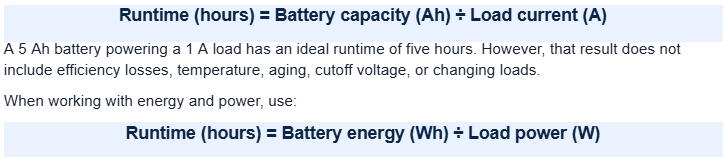
You can compare this approach with DigiKey’s battery-life calculation resource. Both methods provide estimates rather than guaranteed operating times.
Advanced Battery Settings
Battery efficiency represents the percentage of stored energy that becomes usable output. The battery aging factor accounts for capacity lost as a battery experiences time, charging cycles, and environmental stress.
The tool also supports cells in series and parallel, discharge C-rate, cutoff voltage, and a battery safety margin calculation. Series connections raise voltage, while parallel connections increase available capacity.
Temperature and Battery Age
Cold conditions can temporarily reduce available capacity and increase internal resistance. Excessive heat may accelerate battery degradation, even if short term performance appears strong.
For detailed educational information about battery behavior and care, visit Battery University. Always use the battery manufacturer’s specifications when safety or critical performance is involved.
Tips for Accurate Estimates
Measure average current consumption instead of relying only on a device’s maximum rating. Include sleep periods, communication events, startup surges, motors, displays, and other changing loads.
Apply a sensible safety margin and use conservative efficiency assumptions. A real-world battery runtime estimate should leave room for colder weather, battery wear, manufacturing differences, and unexpected energy use.
Benefits and Limitations
The calculator is fast, free, flexible, and more informative than a simple capacity divided by current equation. It helps you compare several scenarios before purchasing components.
Nevertheless, every result remains an estimate. Actual runtime depends on battery quality, chemistry, temperature, age, discharge rate, cutoff behavior, wiring losses, and fluctuating device demand.
Conclusion
A battery life calculator takes the fog out of battery planning. Whether I am sizing a battery for a sensor, Arduino project, portable device, or backup system, it helps me test assumptions before building.
FreeWWW combines three calculation modes with multiple battery types, unit conversions, device loads, and advanced adjustments. Use it as a planning guide, then confirm critical designs with manufacturer data and real world testing.
EXPLORE FREE ONLINE TOOLS WITH FREEWWW
Frequently Asked Questions
1. Is the Battery Life Calculator free?
Answer: Yes. You can use the FreeWWW calculator online without paying.
2. Do I need to create an account?
Answer: No. The tool provides battery planning without mandatory registration.
3. How do I calculate battery life from mAh?
Answer: Divide battery capacity in mAh by average load current in mA to estimate ideal runtime in hours.
4. How accurate is a battery runtime calculator?
Answer: It provides an estimate. Accuracy improves when you include efficiency, temperature, aging, and realistic average consumption.
5. Can I calculate several devices together?
Answer: Yes. Add individual components and quantities to calculate their combined power demand.
6. Does it support lithium-ion batteries?
Answer: Yes. It supports lithium-ion, LiPo, NiMH, lead-acid, alkaline, and custom batteries.
7. What efficiency percentage should I use?
Answer: Use manufacturer data when available. Otherwise, choose a conservative value and test several scenarios.
8. What safety margin should I add?
Answer: A 10–20% margin is a practical starting point, although critical systems may require more.
9. What is a C-rate?
Answer: C-rate describes how quickly a battery is charged or discharged relative to its rated capacity.
10. Can I save my battery configuration?
Answer: Yes. The calculator includes options to save and load configurations for later use.