Best Free Retirement Savings Calculator
Introduction
Retirement can feel like a distant island hidden behind fog. You know it is ahead, but how much money will you need to reach it comfortably? A free retirement savings calculator turns that uncertainty into a practical financial projection.
I like this kind of tool because it replaces guesswork with useful numbers. By entering your age, savings, contributions and expected return, you can estimate your future balance, monthly income and overall retirement readiness.
Key Takeaways
What Is a Retirement Savings Calculator?
A retirement savings calculator is a financial planning tool that estimates how much your savings could grow before retirement. It combines your current balance, monthly contributions, investment return and available saving period.
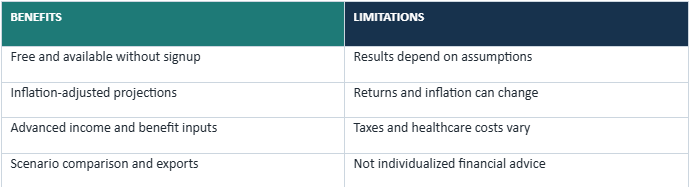
The result is not a crystal ball. Markets and personal circumstances change. However, a thoughtful projection can show whether your current strategy appears realistic and where adjustments may be necessary.
Why Should You Use a Retirement Calculator?
A reliable retirement planning calculator answers important questions such as, “Am I saving enough for retirement?” and “How might inflation affect my lifestyle?” Seeing the numbers early gives you more time to respond.
It also illustrates compound interest for retirement. Your contributions may generate returns, and those returns may produce additional growth. Like a snowball rolling downhill, time can make consistent savings increasingly powerful.
Estimate Your Future Retirement Savings
A retirement nest egg calculator provides an estimate of your account balance at retirement. It separates personal contributions from potential investment growth, making the value of long-term investing easier to understand. Test different retirement ages or contribution amounts to see how each assumption changes the outcome.
Understand the Effects of Inflation
Inflation gradually reduces purchasing power. An inflation-adjusted retirement calculator displays projected values in today’s dollars, making the estimate more meaningful when planning future expenses.
What Is the FreeWWW Retirement Savings Calculator?
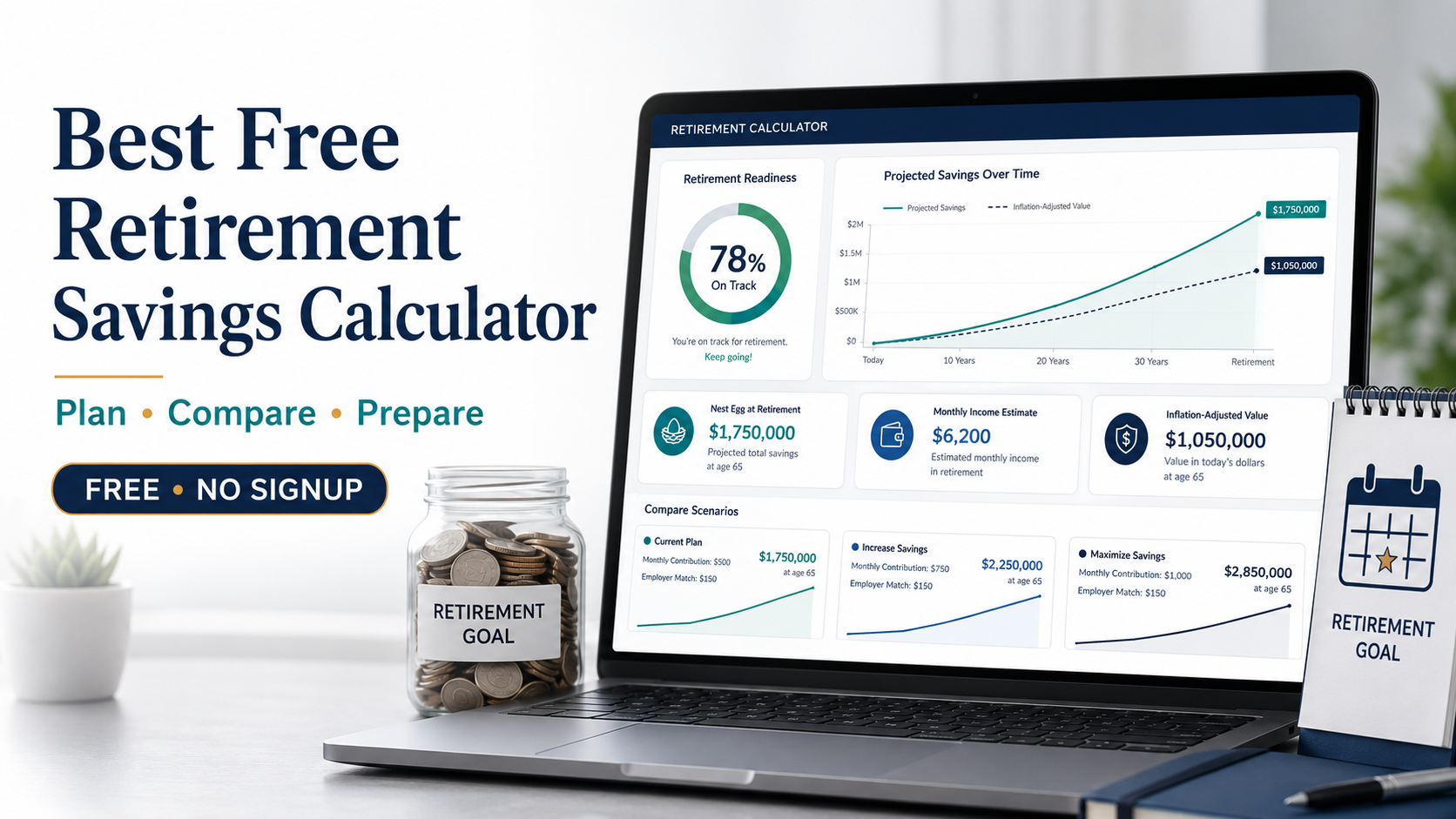
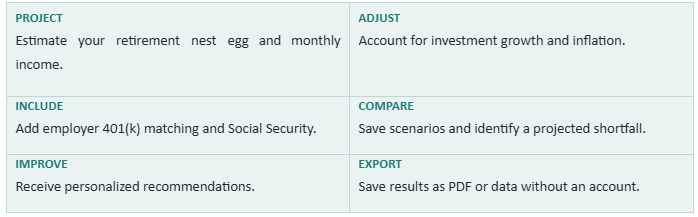
The FreeWWW Retirement Savings Calculator is a free browser-based retirement projection tool. It estimates your retirement balance, monthly income, contributions, investment growth, savings goal and readiness score.
The tool requires no registration. It also supports advanced information, scenario comparison, PDF export and data export, making it more capable than many basic calculators.
Key Features at a Glance
What Information Does the Calculator Require?
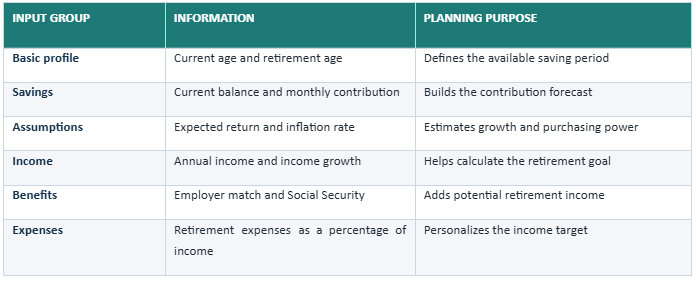
Use realistic assumptions rather than optimistic guesses. The quality of a retirement projection depends on the information entered.
How to Use the Free Retirement Savings Calculator
1 Enter your basic financial details: Add your age, retirement age, existing savings, contribution, return and inflation assumptions.
2 Add optional advanced information: Include employer matching, income growth, retirement expenses and Social Security.
3 Calculate your plan: Select “Calculate My Retirement Plan” to generate the projection.
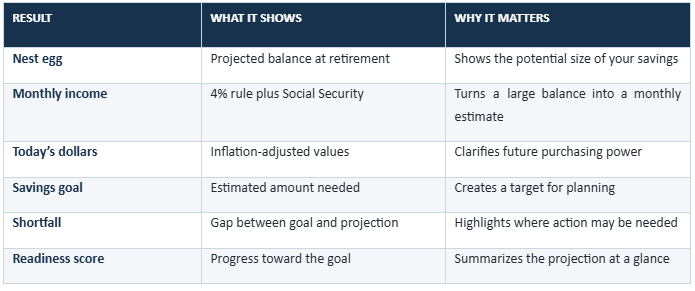
4 Review the complete picture: Read the nest egg, monthly income, goal, shortfall and readiness score together.
5 Save or export: Compare scenarios and export the plan as PDF or data for future reference.
Understanding Your Retirement Projection
Your projection combines your starting balance, future contributions, saving period and assumed return. Extending the investment period or increasing contributions will usually raise the final estimate.
Monthly income is estimated using the 4% retirement withdrawal rule plus Social Security. This is a planning guideline, not a guarantee, because market returns, taxes, fees and withdrawal needs can vary.
External planning resources: Investor.gov Compound Interest Calculator | Social Security Retirement Planner
How to Compare Retirement Scenarios
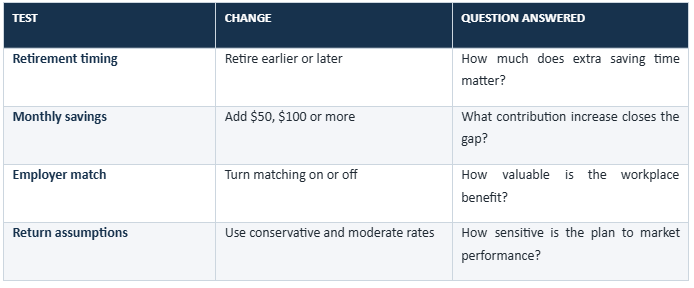
Try one scenario using your current plan, then create alternatives. Scenario comparison reveals which realistic adjustments may have the greatest long-term effect.
How to Improve Your Retirement Readiness Score
Consider increasing monthly savings gradually and contributing enough to receive the full employer match. Directing part of each raise toward retirement can make the increase easier to manage.
Review your target expenses and update the calculation regularly. Retirement planning is not a one-time photograph; it is more like a navigation app that needs current information to suggest a useful route.
Benefits and Limitations
Conclusion: Build a Smarter Retirement Plan
A free retirement savings calculator can make a complicated financial goal feel manageable. It shows where your current path may lead and which adjustments might improve the outcome. Start with realistic numbers, compare several possibilities and revisit your plan as life changes.
READY TO PLAN WITH MORE CLARITY?
START PLANNING YOUR RETIREMENT FREE
Frequently Asked Questions
1. Is the Retirement Savings Calculator free?
Answer: Yes. FreeWWW provides the calculator free of charge.
2. Do I need to create an account?
Answer: No. It supports retirement planning without signup.
3. How much money do I need to retire?
Answer: The amount depends on expenses, retirement age, other income and your desired lifestyle.
4. How accurate is the projection?
Answer: It is an estimate based on your inputs; actual returns and expenses may differ.
5. What investment return should I enter?
Answer: Use a reasonable long-term assumption suited to your investments and risk level.
6. Does the calculator account for inflation?
Answer: Yes. It displays inflation-adjusted values in today’s dollars.
7. Can I include employer 401(k) matching?
Answer: Yes. Enter the match percentage and applicable contribution limit.
8. Can I add Social Security income?
Answer: Yes. The advanced section includes an expected monthly Social Security field.
9. Can I compare multiple retirement plans?
Answer: Yes. Save scenarios to compare ages, contributions and assumptions.
10. Can I export my calculation?
Answer: Yes. The calculator supports PDF and data exports.