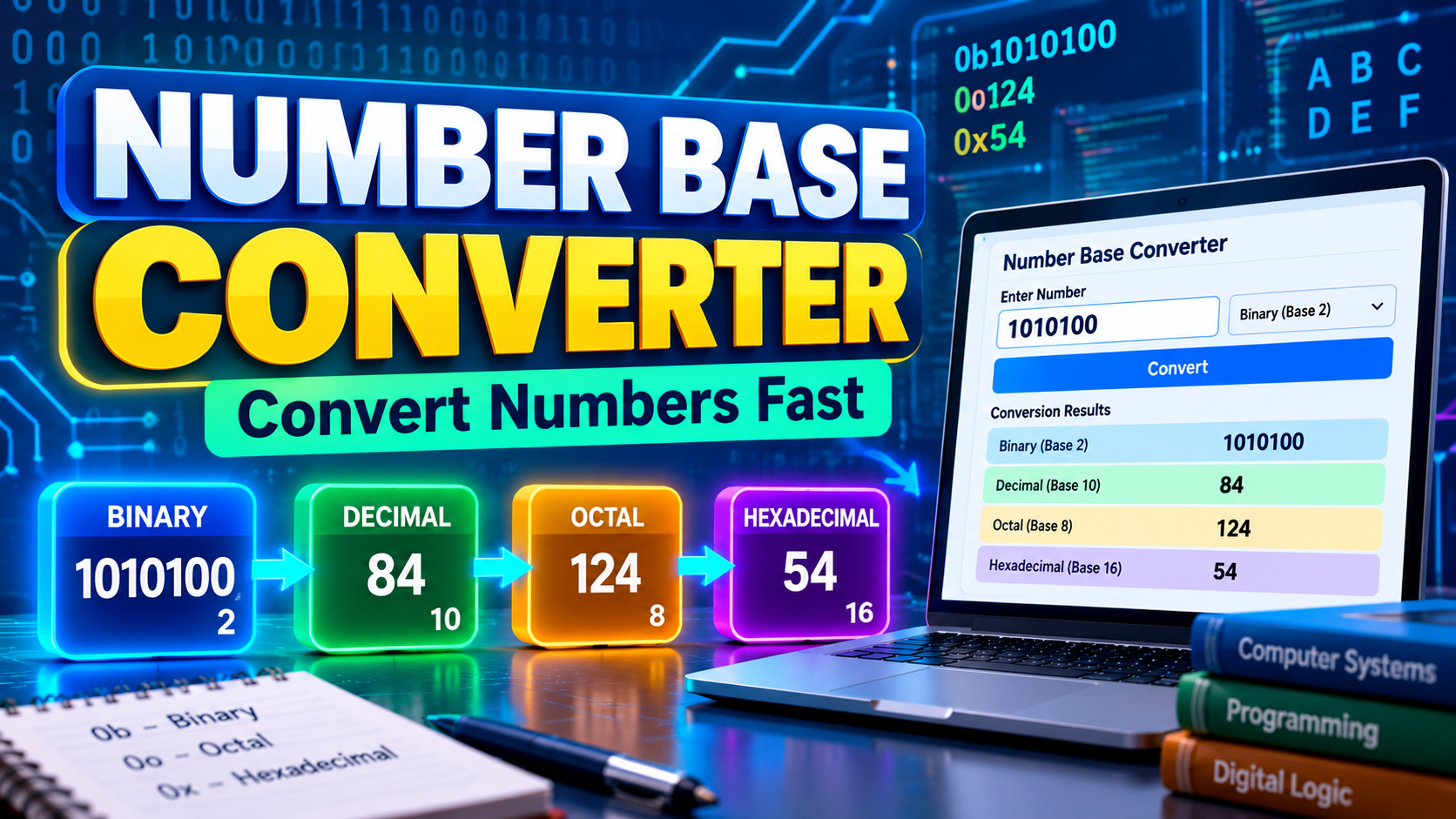
Number Base Converter: Convert Binary, Decimal & More
Numbers are not always represented in the same way. While most people use the decimal system every day, computers rely heavily on binary, programmers often use hexadecimal, and Octal is still encountered in Unix/Linux file permissions, where values such as 755 represent permission bits.
Converting between these systems manually can be time-consuming and confusing. A number base converter makes the process easier by instantly changing values between different number systems with accurate results.
FreeWWW’s Number Base Converter helps users convert numbers between common bases, including binary, decimal, octal, and hexadecimal formats.
What Is a Number Base Converter?
A number base converter is an online tool that changes a number from one numerical system into another.
Every number system uses a base, which determines how many symbols are available.
For example:
- Decimal uses base 10
- Binary uses base 2
- Octal uses base 8
- Hexadecimal uses base 16
A number base converter removes the need for manual calculations by automatically applying the correct mathematical rules.
Understanding Different Number Systems
Decimal System (Base 10)
The decimal system is the standard counting system used in everyday life.
It uses ten digits:
0, 1, 2, 3, 4, 5, 6, 7, 8, 9
For example:
345 means:
- 3 × 100
- 4 × 10
- 5 × 1
Most human calculations use decimal numbers.
Binary System (Base 2)
Computers use binary because digital devices process information through two states, often represented as 0 and 1.
Binary uses only:
0 and 1
Example:
Decimal 10 = Binary 1010
Each position represents a power of two:
1010
= (1 × 8) + (0 × 4) + (1 × 2) + (0 × 1)
= 10
A binary to decimal converter helps users quickly translate between these two important systems.
Hexadecimal System (Base 16)
Hexadecimal is commonly used in programming and computer systems because it represents binary values in a shorter format.
It uses:
0–9 and A–F
Example:
Decimal 255 = Hexadecimal FF
Developers often use hexadecimal for:
- Memory addresses
- Programming values
- Color codes
- Low-level programming and bit-level data representation
Octal System (Base 8)
Octal uses digits from 0 to 7.
Although less common today, octal has historical importance in computing and remains relevant in some technical environments.
How Number Base Conversion Works
Each number system represents values using positional notation.
The value of each digit depends on:
- The digit itself
- Its position
- The base of the system
For example, binary 1101:
(1 × 8) + (1 × 4) + (0 × 2) + (1 × 1)
= 13 in decimal
A conversion tool performs these calculations automatically and displays the result instantly.
Why Use a Number Base Converter?
Manual conversion is useful when you're learning positional notation, but real technical work often involves checking values quickly and accurately.
A number base converter is useful when you need to:
- Verify a programming value
- Read hexadecimal or binary data
- Check a bitmask
- Work with digital logic
- Convert Unix/Linux permission values
- Complete computer-science exercises
- Inspect large integer values
- Understand how a value is represented at the bit level
For learning, the best approach is to use the converter alongside manual calculations rather than treating it as a replacement for understanding the underlying rules.
Binary to Decimal Conversion Explained
Binary conversion is one of the most common needs in computing.
To convert binary into decimal:
- Identify each binary digit.
- Multiply each digit by its positional value.
- Add the results.
Example:
Binary: 1011
Calculation:
(1 × 8) + (0 × 4) + (1 × 2) + (1 × 1)
= 11
A binary to decimal converter automates this process, allowing users to verify results instantly.
Decimal to Binary Conversion
Converting decimal numbers into binary involves repeatedly dividing by 2 and recording the remainders.
Example:
Decimal 13:
13 ÷ 2 = 6 remainder 1
6 ÷ 2 = 3 remainder 0
3 ÷ 2 = 1 remainder 1
1 ÷ 2 = 0 remainder 1
Reading the remainders upward:
13 = 1101 in binary
Online tools simplify this process, especially when working with larger numbers.
How to Convert Binary to Hexadecimal
Binary and hexadecimal are closely related because one hexadecimal digit represents exactly four binary bits.
For example:
Binary: 1010 1100
Split the binary number into groups of four:
- 1010 = A
- 1100 = C
Therefore:
10101100₂ = AC₁₆
This direct relationship makes hexadecimal much more compact than binary when programmers inspect machine data, memory values, or bit patterns.
Binary, Hexadecimal and Octal Prefixes in Programming
Programmers often use prefixes to make the intended number base explicit.
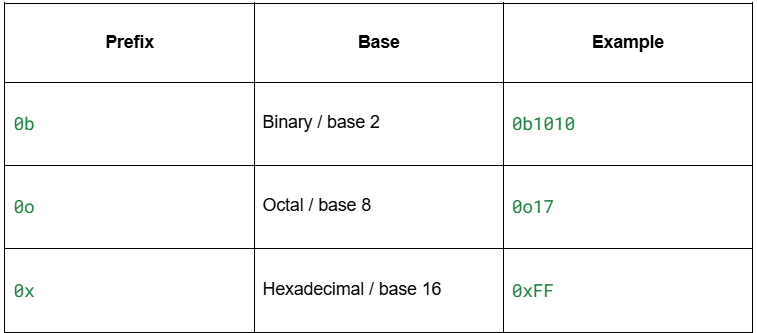
For example, 0b1010, 10, and 0xA all represent the same numerical value in different bases.
The exact literal syntax varies by programming language, so always check the language's documentation when writing source code.
Common Number Representations
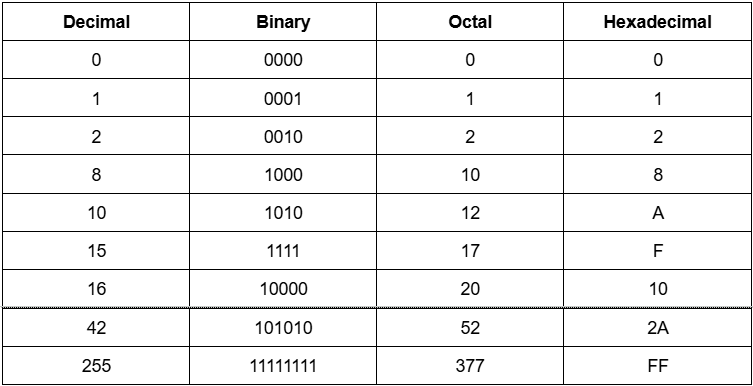
Number Bases in Modern Technology
Different number systems play important roles in technology.
Software Development
Programmers use binary and hexadecimal to understand how computers store and process information.
Web Development
Hexadecimal values define colors in digital designs.
Example:
#FFFFFF represents white.
Cybersecurity
Security professionals analyze binary data, memory values, and encoded information.
Electronics
Engineers use binary systems when designing digital circuits and devices.
Learning Number Systems More Easily
Number bases may seem complicated at first, but understanding the relationship between systems makes them easier.
A good approach is:
- Learn the meaning of each base
- Practice small conversions
- Understand place values
- Use tools to verify calculations
A number base converter can support learning by showing accurate results while users focus on understanding the concepts.
Convert Number Bases With Confidence
Binary, octal, decimal, hexadecimal, and other bases are different ways of representing numerical values using positional notation. Once you understand how place values work, the underlying mathematics becomes straightforward but checking large or technical values manually can still be time-consuming.
FreeWWW's Number Base Converter supports bases 2–36 and adds technical tools for deeper analysis, including exact integer conversion, bit information, two's-complement views, bitwise operations, IEEE 754 representations, step-by-step conversion, and conversion history.
Try the FreeWWW Number Base Converter and convert your next value instantly.
FAQs
1. What is a number base converter?
Answer: A number base converter is an online tool that converts numbers between different systems such as binary, decimal, hexadecimal, and octal.
2. Why do computers use binary numbers?
Answer: Digital electronic systems use binary representations because reliable hardware can distinguish two logical states, conventionally represented as 0 and 1.
3. What is a binary to decimal converter?
Answer: A binary to decimal converter changes numbers written in base 2 into their equivalent decimal values used in everyday mathematics.
4. What is hexadecimal used for?
Answer: Hexadecimal is used in programming, computer memory representation, color codes, and digital systems because it provides a shorter way to represent binary values.
5. How many digits does hexadecimal use?
Answer: Hexadecimal uses 16 symbols: numbers 0–9 and letters A–F representing values from 10 to 15.
6. Can a number base converter convert between any bases?
Answer: Many converters support common bases such as binary, decimal, octal, and hexadecimal. Some advanced tools support additional bases.
7. Is binary conversion difficult to learn?
Answer: Binary conversion becomes easier after understanding place values and powers of two. Practice helps improve speed and accuracy.
8. What is the difference between decimal and binary?
Answer: Decimal uses ten digits (0–9), while binary uses only two digits (0 and 1). Decimal is common for humans, while binary is fundamental for computers.
9. How are hexadecimal numbers used in programming?
Answer: Hexadecimal numbers are often used to represent memory addresses, machine values, and color codes because they are compact compared with binary.
10. Where can I learn more about number systems?
Answer: Educational resources from Khan Academy Computing provide lessons about computer science concepts, including binary and digital systems.