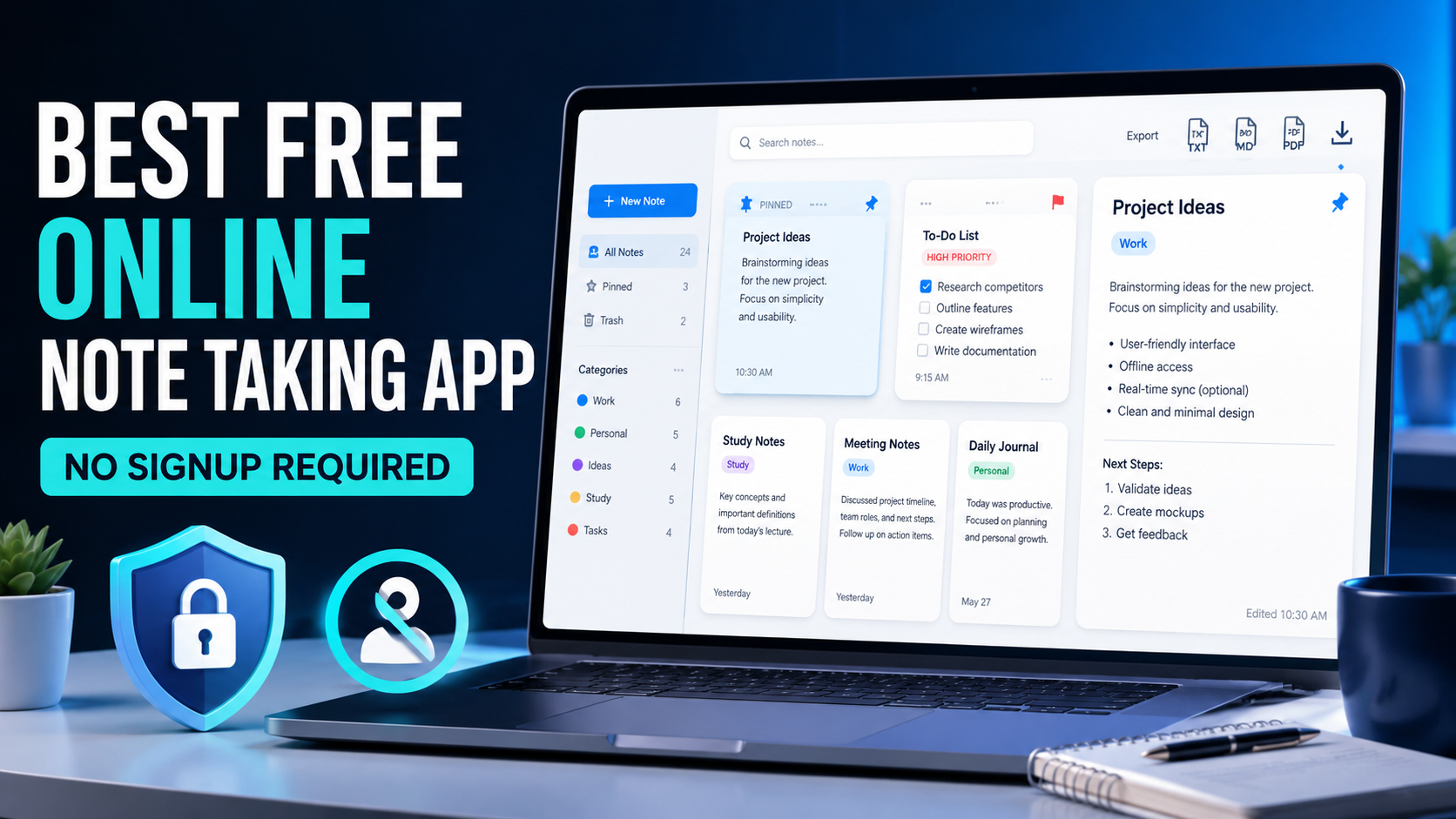
Best Free Online Note Taking App Without Signup

Have you ever needed to save an idea quickly but did not want to create another account or install another program? A free online note taking app removes those barriers and lets you begin writing immediately.
The FreeWWW Note Taking App combines writing, formatting, organization, searching, templates, and export tools in one convenient browser-based note app. It is free to use and requires no signup.
Introduction
Notes are like small containers for our thoughts. They hold ideas, plans, reminders, research, and tasks before those details disappear from memory. A good online note taking app makes capturing and finding that information simple.
I like tools that get out of my way. Instead of registration forms, passwords, or downloads, a no-signup notes app lets me open the page, create a note, and continue with my day.
Key Takeaways
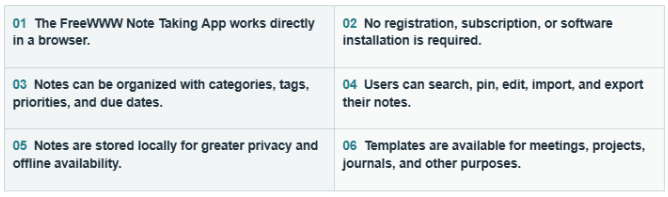
What Is a Free Online Note Taking App?
A free online note taking app is a digital tool that allows you to create and manage notes through a web browser. It can replace scattered paper notes, temporary text files, and messages you send to yourself.
Unlike a basic text box, a modern online notes manager can include formatting, search, categories, tags, templates, priorities, and export options. It works like a searchable filing cabinet for your thoughts.
Why Use an Online Note Taking App Without Signup?
You may only need to record a quick idea, prepare meeting notes, or create a task list. Creating an account before doing that adds unnecessary friction.
A private note taking tool without registration gives you quick access while reducing the amount of personal information you share online.
Start Taking Notes Immediately
Open the app, select “New Note,” and begin writing. There are no email confirmations, passwords, or onboarding screens slowing you down.
This immediate access makes it a useful free productivity tool when you need to capture an idea before it disappears.
Keep Your Notes Private
The app saves notes locally on your device instead of requiring an online account. This makes it a practical local storage notes app for personal writing.
You remain responsible for your browser data and backups, but your notes are not tied to a public profile or mandatory cloud account.
Avoid Downloads and Installations
Because it works in your browser, you do not need to install desktop software. This saves storage space and avoids lengthy setup processes.
A browser-based note app is especially convenient on shared, older, or low-storage computers.
What Is the FreeWWW Note Taking App?
The FreeWWW tool is a feature-rich digital notebook for creating, organizing, searching, and exporting
notes. It works entirely through your browser and does not require registration.
Its dashboard displays your total notes, words, categories, high-priority items, and pinned notes. This gives you a quick view of your information without opening every note.
Key Features of the Free Online Note Taking App
Create and Edit Notes Online
You can add a title, content, category, priority, due date, and tags to each note. Saved notes can be reopened and updated whenever necessary.
This makes it easy to create notes online for work, study, projects, or everyday planning.
Format Notes With the Rich-Text Editor
The rich-text notes editor includes bold, italic, underline, strikethrough, headings, lists, checklists, links, quotes, code blocks, and horizontal lines.
Good formatting turns a wall of words into a clear map. Headings separate ideas, while lists make instructions and tasks easier to scan.
Organize Notes With Categories and Tags
notes. It works entirely through your browser and does not require registration.
Its dashboard displays your total notes, words, categories, high-priority items, and pinned notes. This gives you a quick view of your information without opening every note.
Key Features of the Free Online Note Taking App
Create and Edit Notes Online
You can add a title, content, category, priority, due date, and tags to each note. Saved notes can be reopened and updated whenever necessary.
This makes it easy to create notes online for work, study, projects, or everyday planning.
Format Notes With the Rich-Text Editor
The rich-text notes editor includes bold, italic, underline, strikethrough, headings, lists, checklists, links, quotes, code blocks, and horizontal lines.
Good formatting turns a wall of words into a clear map. Headings separate ideas, while lists make instructions and tasks easier to scan.
Organize Notes With Categories and Tags
notes. It works entirely through your browser and does not require registration.
Its dashboard displays your total notes, words, categories, high-priority items, and pinned notes. This gives you a quick view of your information without opening every note.
Key Features of the Free Online Note Taking App
Create and Edit Notes Online
You can add a title, content, category, priority, due date, and tags to each note. Saved notes can be reopened and updated whenever necessary.
This makes it easy to create notes online for work, study, projects, or everyday planning.
Format Notes With the Rich-Text Editor
The rich-text notes editor includes bold, italic, underline, strikethrough, headings, lists, checklists, links, quotes, code blocks, and horizontal lines.
Good formatting turns a wall of words into a clear map. Headings separate ideas, while lists make instructions and tasks easier to scan.
Organize Notes With Categories and Tags
Due dates are particularly useful for project notes, assignments, follow ups, and weekly planning.
Pin Important Notes
You can pin important notes so they remain easy to access. A pinned note works like a sticky note placed at the top of your desk.
Use this feature for current goals, essential instructions, active projects, or frequently referenced information.
Search and Filter Your Notes
The searchable notes app can search by title, content, or tags. You can also filter notes by category and priority or change their sorting order.
This is valuable when your notebook grows. Instead of scrolling endlessly, you can locate the right note in seconds.
Track Words, Notes, and Categories
The dashboard includes a note word counter and statistics for notes, categories, priorities, and pinned items.
These details can help writers track progress and help busy users understand how their notes are organized.
Which Note Taking Templates Are Available?
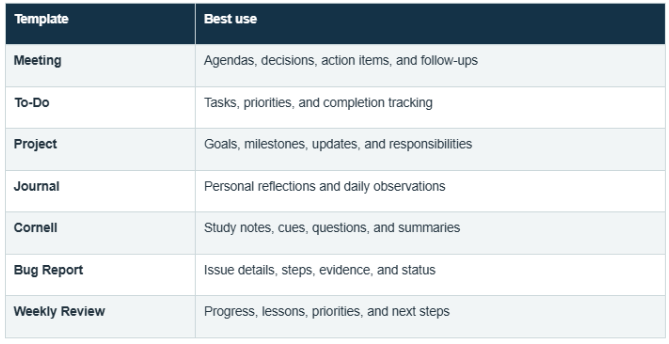
The app provides several note taking templates, including Meeting, To-Do, Project, Journal, Cornell, Bug Report, and Weekly Review.
Templates provide a ready-made structure, so you do not have to build every note from an empty page.
Meeting, To-Do, and Project Templates
The meeting notes template helps record agendas, decisions, and action items. The To-Do template supports structured online to-do notes, while the project notes template keeps goals, tasks, and updates together.
These templates are helpful for professionals, freelancers, students, and teams managing ongoing responsibilities.
Journal, Cornell, and Weekly Review Templates
The Journal template turns the tool into a simple personal journal app. The Cornell notes template helps students divide information into notes, cues, and summaries.
Cornell University recommends recording, questioning, reciting, reflecting, and reviewing notes as part of its Cornell note-taking system. The Weekly Review template can similarly help you reflect on progress and prepare for the next week.
How to Use the Free Online Note Taking App
Step 1: Open the App
Visit the FreeWWW Note Taking App. The app opens in your browser without asking you to register.
Step 2: Create a New Note
Select “New Note” or use the Ctrl+N keyboard shortcut. You can begin with a blank note or choose a suitable template.
Step 3: Add Details
Enter a descriptive title, select a category and priority, add a due date, and include relevant tags.
Step 4: Format and Save
Use the formatting toolbar to add headings, lists, checkboxes, links, or emphasis. Select “Save Note” when you finish.
Step 5: Search, Edit, or Export
Use the search and filter tools to find saved notes. You can edit individual notes or export your collection for backup.
How Does the App Protect Your Privacy?
Local Browser Storage Explained
The app uses browser notes with local storage, meaning your notes remain on the device and browser where you created them.
This provides privacy, but clearing browser storage may delete saved notes. Export important information regularly before changing browser settings.
Offline Access Without an Account
Locally stored information may remain available without signing into an account, making the tool useful for private offline notes.
However, local notes do not automatically synchronize between devices. Open the exported file on another device when you need to transfer your information.
How Can You Export and Back Up Notes?
You can export notes as JSON, export notes as HTML, or use the print option to save notes as PDF. JSON is useful for backups and later importing, while HTML creates a readable browser file.
The import feature lets you import notes online from a compatible backup. Keeping a regular export protects your work if browser data is removed or the device becomes unavailable.
Additional Note-Taking and Editing Tools
The editor supports images, voice input, drawings, tables, links, code, and quotations. You can add images to notes, record voice notes online, or use the drawing pad for notes.
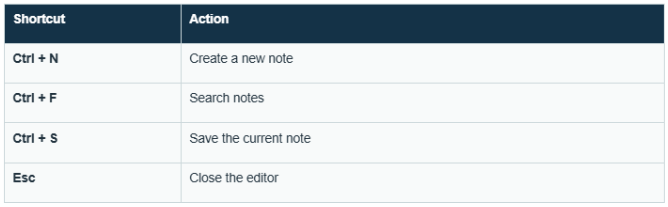
Keyboard shortcuts make common actions faster: Ctrl+N creates a note, Ctrl+F opens search, Ctrl+S saves, and Esc closes the editor.
Quick Keyboard Shortcuts
Who Should Use This Online Notes App?
Students can save lecture notes, assignments, and research. Professionals can manage meetings, project updates, and follow-ups.
Writers can plan articles and track word counts, while everyday users can maintain shopping lists, personal goals, reminders, and journal entries.
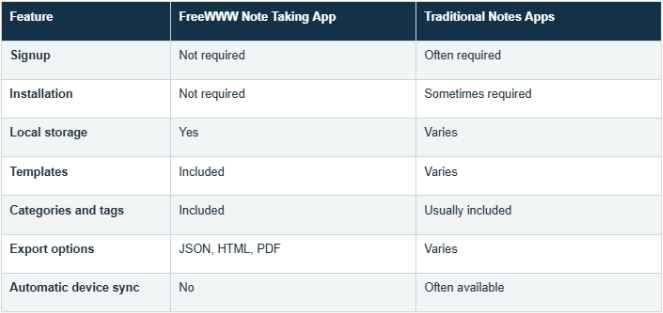
FreeWWW Note Taking App vs. Traditional Notes Apps
Tips for Organizing Your Digital Notes
Use a small number of clear categories and consistent tags. Give every note a descriptive title instead of names such as “New Note” or “Ideas.”
Pin only active notes, review high-priority items regularly, and export backups. A tidy personal notes organizer should feel like a labeled bookshelf not a drawer filled with loose paper.
Advantages and Limitations of Browser-Based Notes
The main advantages are speed, privacy, free access, and no installation. You can write notes online for free and organize them with useful productivity features.
The main limitation is the lack of automatic cross-device synchronization. Because notes are stored locally, clearing browser data without creating a backup may remove them.
Is This the Best Free Online Note Taking App?
The FreeWWW tool is a strong choice if you want an accessible free notes app with templates, formatting, organization, search, and export options.
It is especially suitable for users who value privacy and want online notes without registration. Users needing real-time collaboration or automatic cloud syncing may need a different solution.
Conclusion: Start Taking Notes Without Signup
A reliable free online note taking app should help you capture ideas instead of creating more obstacles. FreeWWW offers a practical balance of simplicity and useful features.
Whether you are managing work, studying, journaling, or planning a project, this online notebook tool helps keep important information organized and accessible.
START TAKING NOTES FREE WITH FREEWWW
Frequently Asked Questions
1. Is the FreeWWW Note Taking App completely free?
Answer: Yes. It is a free notes app that can be used through your browser.
2. Do I need to create an account?
Answer: No. You can use this no-signup notes app without registration.
3. Where are my notes stored?
Answer: Your notes are stored locally in your browser on the device you use.
4. Can I access my notes offline?
Answer: Local storage may provide offline availability, but you should open and test the app before relying on it without internet access.
5. Can I organize notes with tags and categories?
Answer: Yes. You can organize notes online using custom categories, tags, priorities, and pinned status.
6. Can I export my notes as a PDF?
Answer: Yes. Use the print option to print your notes or save them as a PDF file.
7. Does the app include note templates?
Answer: Yes. Templates include Meeting, To-Do, Project, Journal, Cornell, Bug Report, and Weekly Review.
8. Can I add images or drawings to my notes?
Answer: Yes. The editor includes image, voice, and drawing too
9. Will my notes sync across different devices?
Answer: No automatic synchronization is advertised. Export and import your notes when transferring them between devices.
10. What happens if I clear my browser data?
Answer: Your locally saved notes may be deleted. Export a JSON backup before clearing browser or site data.