Free Regex Learning & Testing Tool for Developers
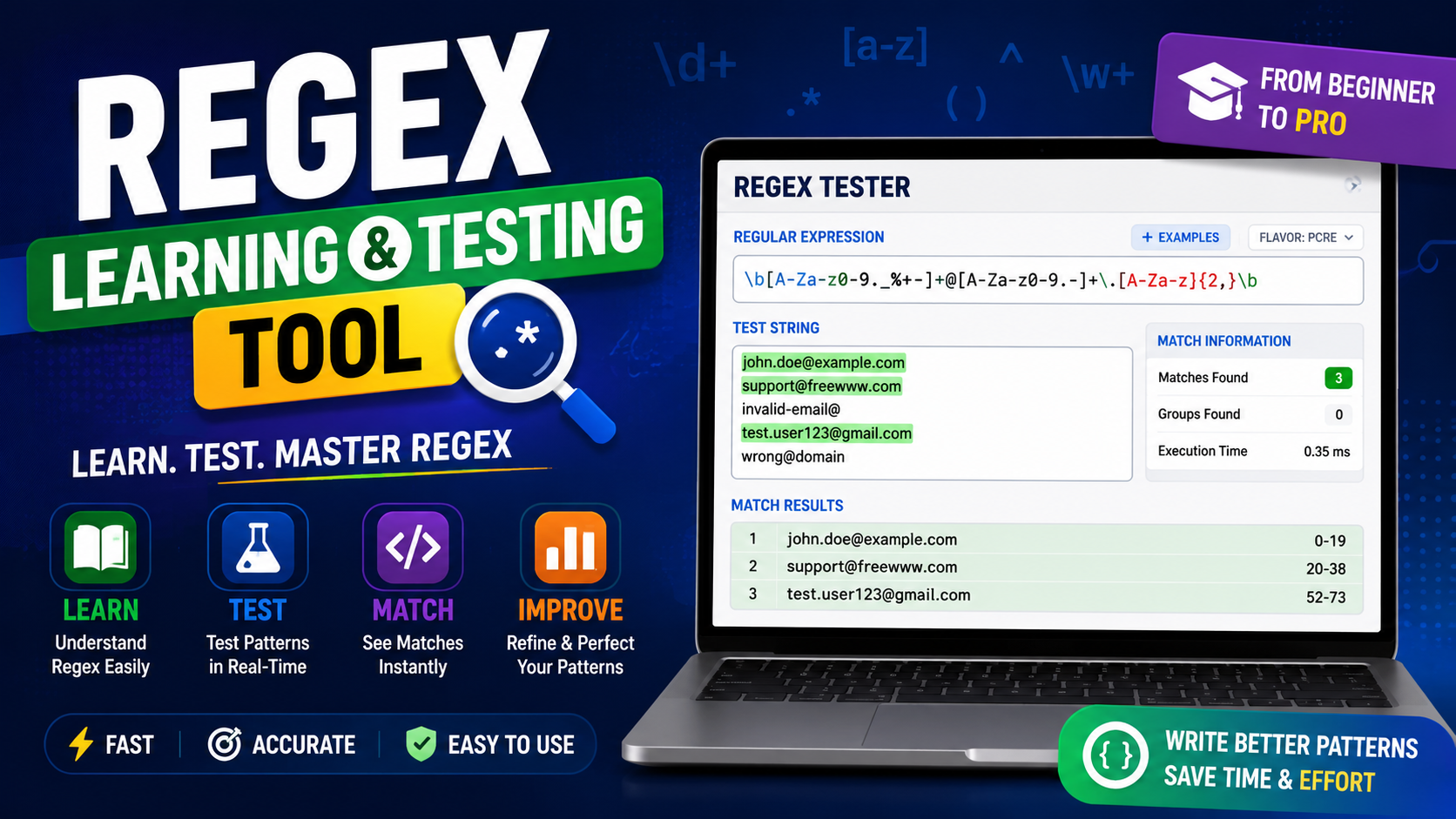
Regular expressions can turn a messy block of text into useful, structured data, but only when the pattern behaves exactly as expected. The FreeWWW Regex Learning & Testing Tool gives you one place to write a pattern, add sample text, apply flags, review matches, and refine the result in real time. It is designed for beginners learning regex and experienced developers who want a quick way to test before adding a pattern to code.

What Is Regex and Why Is Testing Important?
Regex, short for regular expression, is a compact pattern language used to find, validate, extract, or replace text. Developers use it in form validation, search features, log analysis, data cleaning, scripts, and automation. A small mistake such as a missing escape character, the wrong anchor, or an unnecessary wildcard can produce incomplete matches or include data you did not intend to capture.
Testing is therefore part of writing the pattern, not a final step. A real-time regex pattern test lets you compare the expression with both valid and invalid examples. You can see where the match begins and ends, whether capture groups return the correct values, and how flags change the result.
How to Test Regex Patterns Online

- Enter the regex pattern. Type or paste the expression into the pattern field. Start with the smallest pattern that describes what you need.
- Add realistic sample text. Include valid examples, invalid examples, different spacing, mixed letter cases, and any formatting variations your application may receive.
- Choose regex flags. Use flags such as global, case-insensitive, or multiline only when the task requires them.
- Review matches and groups. Check the highlighted text, match count, captured values, and the exact character positions.
- Refine and retest. Change one part of the pattern at a time. Retest after every edit so you can identify what improved or broke the result.
Try the tool: FreeWWW Regex Learning & Testing Tool
Key Features of the Regex Learning & Testing Tool
Real-time match highlighting
Enter a pattern and sample text to see matches immediately. Visual highlighting makes it easier to identify partial matches, unexpected characters, and missing results.
Practical tutorials and examples
Learn through patterns for email addresses, URLs, phone numbers, dates, and other common text formats. Examples provide a starting point that you can adapt to your own data.
Support for regex flags
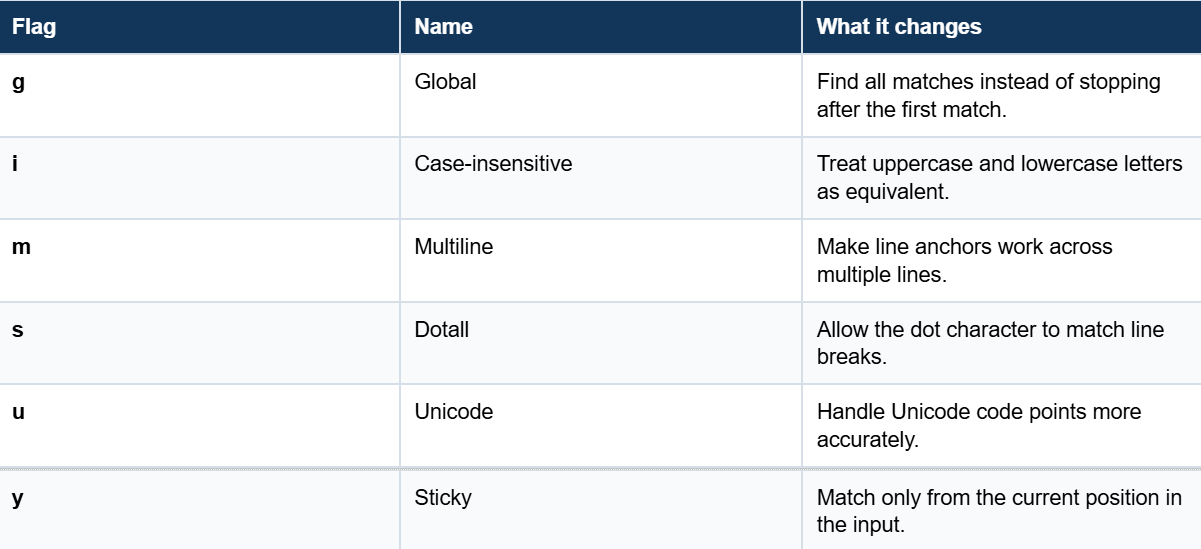
Adjust how the expression scans text with global, case insensitive, multiline, dotall, Unicode, and sticky flags.
Pattern library
Save frequently used patterns locally so they are easier to reuse in future projects.
Capture groups and replacement testing
Inspect captured values and preview replacements using references such as $1 and $2 before applying the expression in code.
Regex Flags at a Glance
Practical Regex Examples
The best examples are simple enough to understand and realistic enough to test. The patterns below are suitable for learning and experimentation. For production validation, always test the exact requirements of your application and the regex engine used by your programming language.
1. Test a Common Email Format
\b[A-Za-z0-9._%+-]+@[A-Za-z0-9.-]+\.[A-Za-z]{2,}\b
This example looks for a common email structure: a local name, an at sign, a domain, and a final extension. Add several valid and invalid examples to the test field rather than checking only one address.
2. Find Dates in YYYY-MM-DD Format
\b\d{4}-\d{2}-\d{2}\b
This pattern finds text that follows the four-digit year, two digit month, and two-digit day format. It checks the shape of the date, not whether a date such as 2026-19-88 is logically valid.
3. Extract URLs
https?://[^\s]+
The optional s allows both http and https. The pattern then continues until whitespace appears. Use sample text containing punctuation after a URL to see whether further refinement is needed.
4. Capture First and Last Names
^([A-Za-z]+)\s+([A-Za-z]+)$
The first pair of parentheses becomes capture group 1, and the second becomes capture group 2. A replacement such as $2, $1 can preview the same name in last-name-first order.
How Capture Groups and Replacements Work
Parentheses create capture groups. Each group stores the part of the match found inside it, making it possible to extract or reorganize text. For example, a date pattern can capture the year, month, and day separately. Replacement references such as $1, $2, and $3 can then rebuild the result in another format.
Example:
Pattern: (\d{4})-(\d{2})-(\d{2})
Sample: 2026-07-27
Replacement: $3/$2/$1
Preview result: 27/07/2026
Common Regex Testing Mistakes and How to Fix Them
Tips for More Accurate Regex Validation
- Begin with a small pattern and add complexity only after the basic match works.
- Use realistic data from the same type of input your form, script, or application will receive.
- Test empty values, extra spaces, different letter cases, line breaks, and unexpected punctuation.
- Use non-capturing groups when you need grouping but do not need to extract the group.
- Avoid overly broad expressions that are difficult to explain or maintain.
- Save reliable patterns in the local pattern library for consistent reuse.
- Test the final pattern in the same programming language or application where it will be used.
Who Can Benefit from This Tool?
- Developers: Validate patterns for forms, scripts, search features, and application logic before deployment.
- Data analysts: Extract dates, numbers, emails, or other structured values from unstructured text.
- Students and beginners: Learn syntax through immediate visual feedback instead of memorizing every rule before practicing.
- QA engineers: Test input rules, logs, and reports with both normal data and edge cases.
- Content and operations teams: Clean text lists, identify repeated formats, and preview structured replacements without building a full script first.
Why Use the FreeWWW Online Regex Tester?
The FreeWWW tool combines learning and testing in the same workflow. You do not have to switch between a syntax guide, a separate tester, and a replacement preview. The interface is designed to help you see what the pattern is doing, understand why it behaves that way, and improve it one step at a time.
- No signup is required.
- Matches appear in real time.
- Capture groups and replacements are visible.
- Common examples make it easier to start.
- Multiple regex flags are available.
- Frequently used patterns can be saved locally.
Getting Started
1. Open the FreeWWW Regex Learning & Testing Tool.
2. Enter a regex pattern or choose an example.
3. Paste sample text that includes expected matches and non-matches.
4. Select the flags required for your use case.
5. Review highlighted results and captured groups.
6. Adjust the expression until it handles the full test set correctly.
7. Save the final pattern for later reuse.
Conclusion
A reliable regular expression is built through testing, not guesswork. The FreeWWW Regex Learning & Testing Tool makes that process faster by bringing patterns, sample text, flags, highlighted matches, capture groups, and replacements into one browser-based workspace. Whether you are validating an email field, extracting data, debugging code, or learning regex for the first time, the tool helps you move from a rough idea to a pattern you can understand and use with confidence.
Explore more free tools on FreeWWW
Frequently Asked Questions
What is the Regex Learning & Testing Tool?
Answer: It is a free online platform for writing, testing, and validating regular expressions against sample text in real time.
Do I need an account to use the tool?
Answer: No. The tool can be opened and used without registration.
Where can I learn more about regex syntax?
Answer: Check the MDN Web Docs Regex Guide for authoritative reference and examples.
What is the best way to test regex online?
Answer: Use representative sample text, include both valid and invalid cases, apply only the flags you need, and review every highlighted match and capture group.
Does the tool include regex examples?
Answer: Yes. Examples cover common tasks such as email matching, URL extraction, phone numbers, dates, and other validation or extraction patterns.
Can I use capture groups and replacements?
Answer: Yes. Parentheses can define capture groups, and replacement references such as $1 and $2 can be previewed in the results.
Is the tool suitable for beginners?
Answer: Yes. Examples, reference material, and immediate feedback make it easier to learn by changing one part of a pattern and seeing the result.
Can this tool help in real-world data extraction?
Answer: Yes, many analysts use it to extract emails, dates, or numeric data from text efficiently. For best practices, see Regex Tutorial on Regex101.