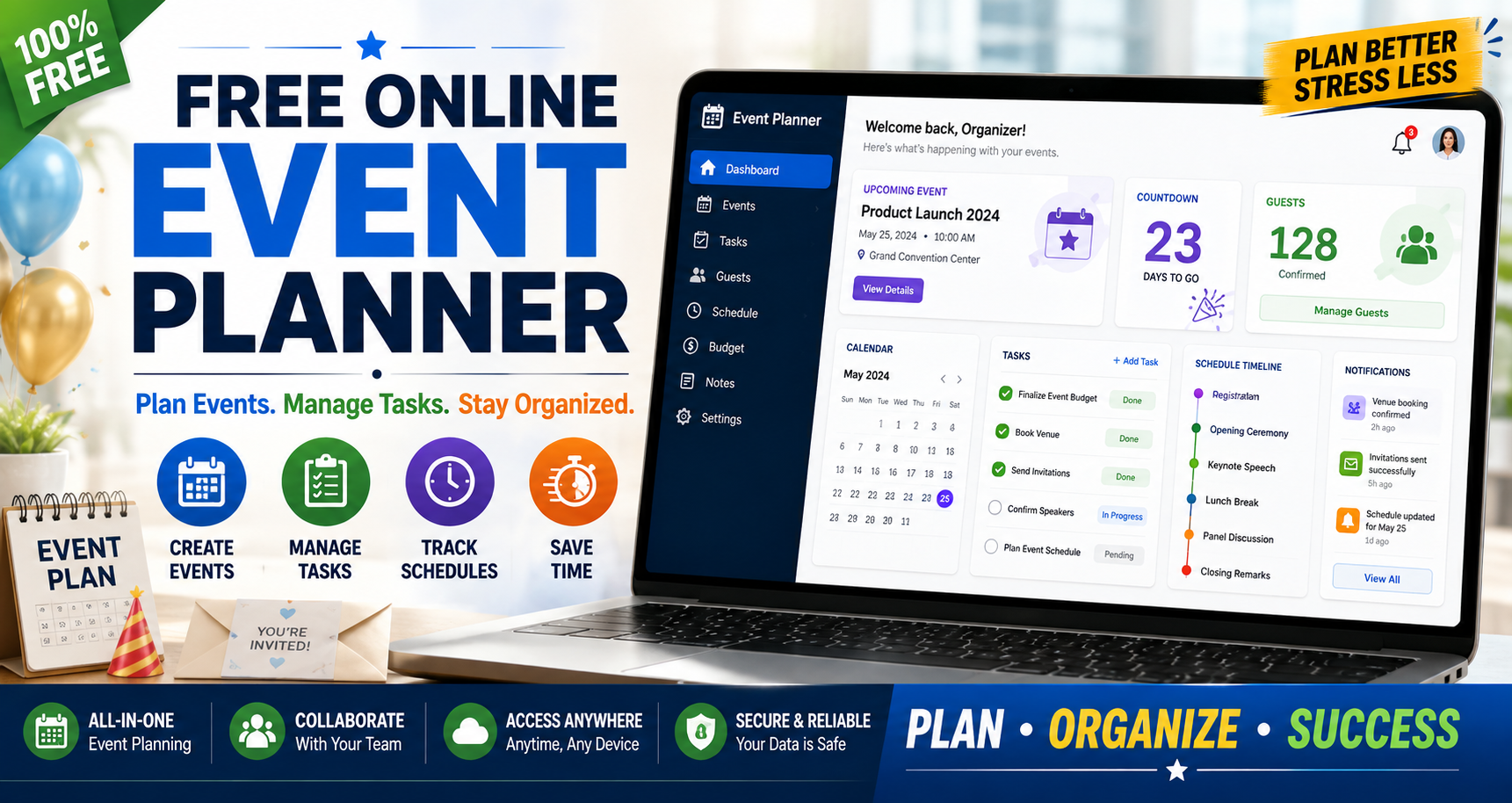
Free Online Event Planner for Stress-Free Event Management
Introduction
A Free Online Event Planner helps individuals and teams organize every stage of an event from initial planning and scheduling to task tracking and final preparation. By keeping deadlines, responsibilities and important details in one place, it reduces confusion and makes event management easier.
Planning usually becomes difficult because information is scattered. The date may be in a calendar, guest updates in messages, supplier notes in a document and unfinished tasks in someone else's memory. The problem is rarely a lack of effort; it is the absence of one clear planning system.
The FreeWWW Event Planning Tools Suite is designed for people who want a practical online event planning tool without the setup and cost of enterprise software. It provides a structured place to organize the event goal, schedule, preparation tasks, guest details and final checks. This makes it useful for a birthday celebration, business meeting, workshop, school program or community event.
Quick answer: What is a free online event planner?
A free online event planner is a browser based workspace that helps individuals and teams organize an event from the first idea to the final review. It brings dates, tasks, guest information, schedules and preparation notes together so planners can see what needs to happen, when it is due and what still requires attention.
Why Use an Online Event Planner?
Traditional planning methods can work when an event has only a few moving parts. They become harder to manage when the date changes, a guest cancels, a task is reassigned or a new requirement appears. A centralized plan makes the latest information easier to find and reduces the chance of acting on an outdated note.
- Keep event dates, objectives, contacts and preparation notes together.
- Turn a large event into smaller, visible tasks with deadlines.
- Review what is complete, what is late and what still needs attention.
- Organize guest, participant and team information in one planning flow.
- Access the plan through a browser instead of relying on separate paper notes.
What makes an online planner different?
Unlike basic notes or spreadsheets, an online event planner is designed around the way events actually develop. It combines scheduling, task management and organization features so planners can see what needs to happen, when it needs to happen and who is responsible.
What the FreeWWW Event Planning Tools Suite Adds
The suite is most useful when the goal is to create a clear event workflow rather than build a complicated project-management system. Its value comes from connecting the main planning areas instead of storing each one in a different place.
Event overview
Record the purpose, audience, date, location and key notes before detailed preparation begins.
Schedule planning
Arrange milestones, deadlines and event-day activities in the order they need to happen.
Task tracking
Break preparation into manageable actions and monitor progress as the event approaches.
Guest and participant organization
Keep attendance information, communication needs and important participant details connected to the event plan.
Centralized workflow
Review schedules, tasks and event details without searching through several separate files.
Start planning: Open the FreeWWW Event Planning Tools Suite
How to Use a Free Online Event Planner
- Define the event goal and audience. Write down what the event should achieve, who it is for and what a successful result will look like.
- Set the event date and key milestones. Work backward from the event date to identify booking, invitation, preparation and review deadlines.
- Create a task timeline. Turn broad responsibilities into clear actions such as confirming the venue, preparing materials or sending reminders.
- Organize guests and participants. Record who needs to attend, what information they require and when communication should be sent.
- Build the event day schedule. Arrange arrival times, sessions, activities, breaks and closing responsibilities in the correct order.
- Review progress regularly. Check completed tasks, upcoming deadlines and unresolved details before they become urgent.
Free Online Event Planner Checklist
Before the event begins, review these essential preparation steps:
- Define the event goal and intended audience.
- Confirm the date, time, format and location.
- Create a task timeline with clear deadlines.
- List guests, participants, speakers or team members.
- Assign responsibilities and identify one owner for each task.
- Track resources, materials, bookings and important notes.
- Prepare invitations, reminders and participant updates.
- Create a detailed event-day schedule.
- Review risks, backup options and last-minute requirements.
- Complete a final check before the event starts.
A digital event planner makes this checklist easier to manage because the deadlines and responsibilities remain visible throughout preparation rather than being reviewed only at the end.
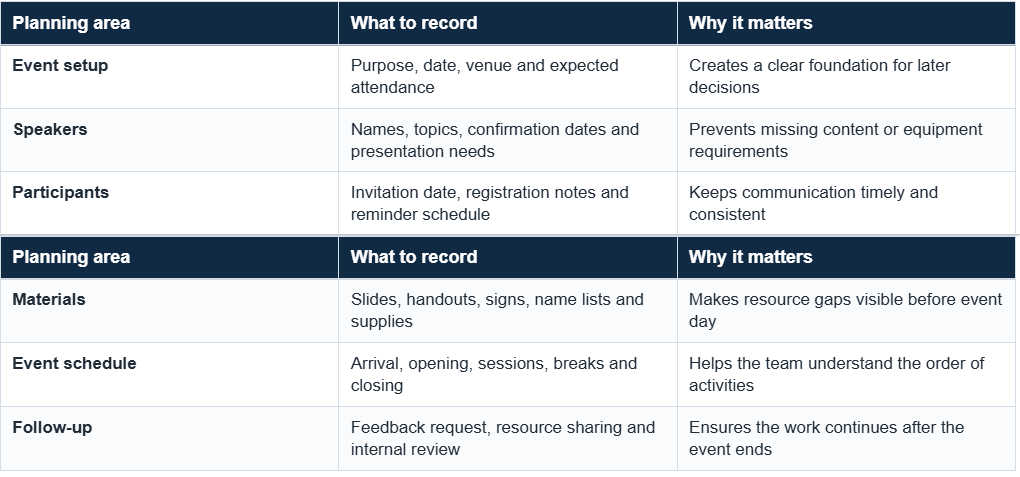
Example Workflow: Planning a 50 Person Workshop
A practical example shows where a planner adds value. Imagine a small business preparing a half day workshop for 50 participants. The organizer does not need enterprise event software, but several details still have to move in the right order.
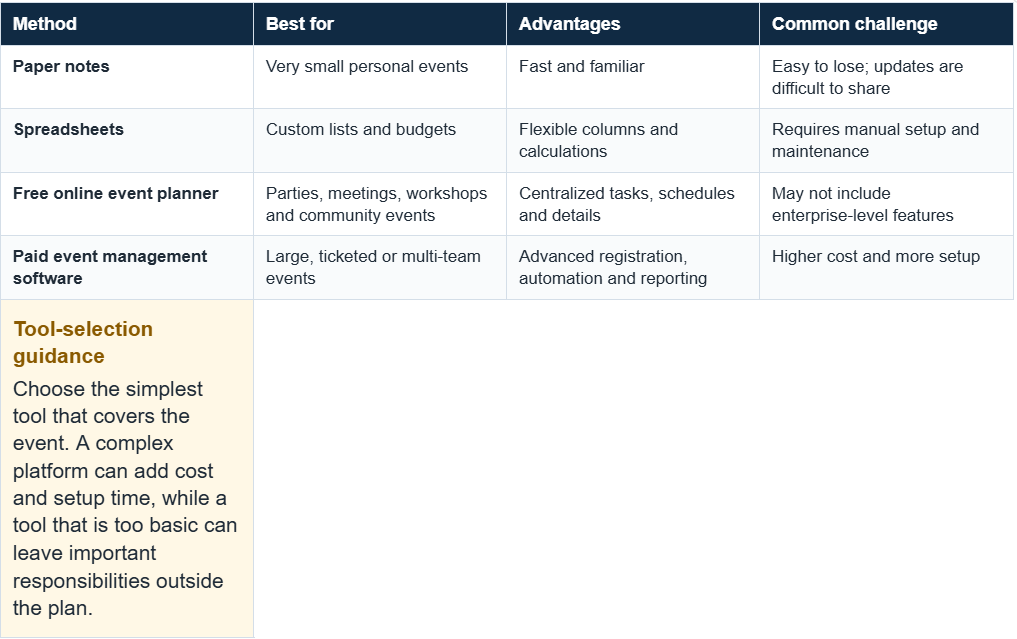
Free Online Event Planner vs. Traditional Planning Methods
Who Should Use a Free Online Event Planner?
- Individuals and families: Use it as a party planning tool for birthdays, family gatherings, celebrations and personal occasions.
- Small businesses: Use a meeting planner online for launches, customer events, internal meetings and short workshops.
- Teachers and students: Organize seminars, class events, group presentations and learning activities.
- Community groups: Coordinate local programs, volunteer activities, fundraisers and public gatherings.
- Freelancers and organizers: Manage smaller client events that need a clear timeline without expensive software.
Important Features to Look for in an Event Planning Tool
Calendar and schedule views
Dates, deadlines and event day activities should be easy to understand without opening several separate lists.
Task management
The planner should show what is due, what is complete and what still needs action.
Guest management and collaboration
For events involving multiple people, the tool should make it easier to manage guest information, share updates, assign responsibilities and keep everyone aligned.
Notes, resources and budget details
A useful workflow should provide a place for important requirements, costs, bookings or resource information.
Simple user experience
A planner should reduce mental workload rather than create another system that takes longer to manage than the event itself.
Browser accessibility
Online access makes it easier to review planning information from different devices when preparation is happening away from a desk.
When Is a Free Event Planner Enough?
A free event planner tool is usually enough when the main requirement is organizing schedules, tasks, guests and preparation details. It is a practical option for personal events, small business meetings, workshops, school activities and community programs where advanced ticketing or enterprise reporting is unnecessary.
Paid event management software may be more appropriate when you need:
- Large scale ticket sales and payment processing.
- Complex registration, badge printing or attendee check-in.
- Multiple event teams with detailed permission controls.
- Advanced marketing automation, analytics or sponsor reporting.
- Enterprise integrations or formal compliance requirements.
This distinction matters because “free” should not be treated as automatically better. The right choice depends on event size, risk, team structure and the features required to deliver the event successfully.
Tips for Better Event Planning
- Start earlier than feels necessary. Extra time gives you room to solve venue, guest or resource problems without rushing.
- Work backward from the event date. Deadlines are easier to set when each task is connected to the next stage.
- Write tasks as clear actions. “Send speaker confirmation” is more useful than a vague note such as “speaker.”
- Assign one owner to each task. Shared responsibility often becomes no responsibility unless one person is clearly accountable.
- Review the plan at fixed intervals. A short weekly check can reveal delays before they become last-minute problems.
- Prepare a backup plan. Weather, technology, attendance and supplier changes are easier to handle when alternatives are considered early.
Conclusion
A successful event is easier to manage when dates, tasks, guests and responsibilities are visible in one place. A Free Online Event Planner provides that structure without forcing planners to build a system from scratch or invest in software designed for much larger events.
Start planning your next meeting, celebration, workshop or community event with the Event Planning Tools Suite. Organize schedules, tasks and preparation details in one structured workflow designed to make event management simpler.
PLAN YOUR NEXT EVENT
Open the FreeWWW Event Planning Tools Suite
Frequently Asked Questions
1. What is a Free Online Event Planner?
Answer: It is a browser-based tool that organizes event dates, schedules, tasks, guest information and preparation details in one workspace.
2. Who can use an online event planning tool?
Answer: Individuals, small businesses, educators, students, community groups and event organizers can use one to structure event preparation.
3. What types of events can be planned online?
Answer: Online planners can support parties, meetings, workshops, conferences, school activities, community events and other personal or professional gatherings.
4. Why use a digital event planner instead of notes?
Answer: A digital planner keeps related information together, makes updates easier to review and reduces the risk of relying on an outdated or missing note.
5. Is a free event planner useful for small businesses?
Answer: Yes. Small businesses can use it to plan meetings, launches, customer events, workshops and internal activities without adopting a complex enterprise platform.
6. What features should event planning software include?
Answer: Useful features include calendars, task tracking, timelines, guest organization, reminders, notes and a clear interface that makes progress easy to review.
7. How do I create an event planning checklist?
Answer: Start with the event goal, date and audience. Then list tasks for scheduling, guests, resources, communication, event-day activities and final review. Assign deadlines and one responsible person where possible.
8. Where can I find more event checklist ideas?
Answer: The Eventbrite event planning checklist covers practical areas such as goals, budgets, venues, schedules, vendors and contingency planning.
9. When should I choose paid event management software?
Answer: Consider a paid platform when you need large-scale registration, ticket payments, advanced reporting, marketing automation, complex permissions or enterprise integrations.
10. Where can I learn more about structured planning?
Answer: The Project Management Institute publishes educational resources on planning, scheduling, responsibilities, risk and project coordination.